Pricing · Teams and Enterprise
Pay for the people who do the work. Everyone else takes part free.
A team buys Jorv as one organisation with one subscription: a Pro or Enterprise seat for each person who works in Jorv, free guest seats for everyone who only reviews, and no seat at all for whoever pays the bill. Your admin installs the engine once, on your own server or cloud account; everyone connects.
Pro seat
$29
a month · $290 a year for one seat
For the people who create work, run AI work or publish.
Enterprise seat
$89
a month · $890 a year for one seat · no minimum
For the people who need single sign‑on, provisioning, classification limits and egress control. Pro for everyone else, in the same subscription At launch.
Guest seat At launch
Free
reviewers, approvers, readers
See the work they are invited to, comment, and approve the cards they are asked to review.
Billing role At launch
Free
no seat
Whoever manages the subscription, seats, invoices and payment.
Prices in US dollars per seat, sales tax included in every state: the price you see is the price you pay. Billed monthly or yearly by Paddle, our merchant of record. Every organisation can try Pro free for 14 days from inside Jorv, with no card.
Which seat does each person need?
Question 1
Do they create work, run AI work or publish?
Yes → question 2. No → question 3.
Question 2
Do they need single sign‑on, classification limits or other governance?
Yes → Enterprise seat, $89. No → Pro seat, $29.
Question 3
Do they review, comment or approve?
Yes → Guest seat, free. No, they pay the bill → Billing role, free.
Working alone? That is a Free install on the Pricing page; it shares with a team by publishing or exporting, not by joining. A seat is counted when a person first signs in, never at invite.
Price your team
Set your seats and see every price.
Monthly at list, or yearly on the volume price, with or without a referral.
Price your team
One checkout buys one tier for now. Mixing Pro and Enterprise in one subscription arrives at launch; until then, talk to us.
The bar is a year at monthly list. Only paid Pro and Enterprise seats count toward the annual volume price; Free licences and guests never do. Monthly, every seat is at list.
The yearly volume price
A bulk discount that grows with every paid seat.
Pay annually and one seat costs two months free, about 17% below monthly list. Every paid seat you add lowers the price of every paid seat, fastest at first, until the discount reaches 40% below monthly list at 50 paid seats. It stays there, and adding a seat always adds to the bill. Only paid Pro and Enterprise seats count: Free licences and guests never do. Monthly is list. An Enterprise agreement uses the same schedule on a 12- or 24-month term.
Total discount below monthly list, by number of paid seats, paying yearly
One paid seat: two months free. From two paid seats, the curve climbs with every seat and reaches the 40% cap at 50 paid seats.
| Paid Pro seats | A year at monthly list | Yearly volume price | Per seat a month | Below monthly list |
|---|---|---|---|---|
| 2 | $696 | $573 | $23.89 | 17.6% |
| 5 | $1,740 | $1,386 | $23.11 | 20.3% |
| 10 | $3,480 | $2,629 | $21.91 | 24.5% |
| 25 | $8,700 | $5,749 | $19.16 | 33.9% |
| 50 | $17,400 | $10,440 | $17.40 | 40% |
| 100 | $34,800 | $20,880 | $17.40 | 40% |
- Pro and Enterprise seats count together. The discount for the subscription's paid seats applies to every paid seat, each at its own tier's list.
- Add or remove a paid seat mid-year and every seat is re-priced on the schedule, prorated to the day.
- An Enterprise agreement uses the same schedule for a 12- or 24-month term: invoiced with purchase orders, NET-30, the price locked for the term, seats trued up quarterly.
- Self-serve yearly plans keep the welcome month and referral credit. Agreements carry no referral credit, welcome month or education price.
What teams pay.
What teams pay
One person
A Free install, or one Pro seat when they need the server to build for them, or to publish
A small team of five
3 Pro seats for the people who work in Jorv; 2 guests who review and approve
A company of twenty workers
18 Pro seats and 2 Enterprise seats for the admins who run governance; any number of guests
An agreement
2 or more paid seats on a 12‑ or 24‑month term: the same yearly schedule, invoiced with purchase orders, NET‑30, the price locked for the term, seats trued up quarterly.
Choose the model per role. Cap the spend.
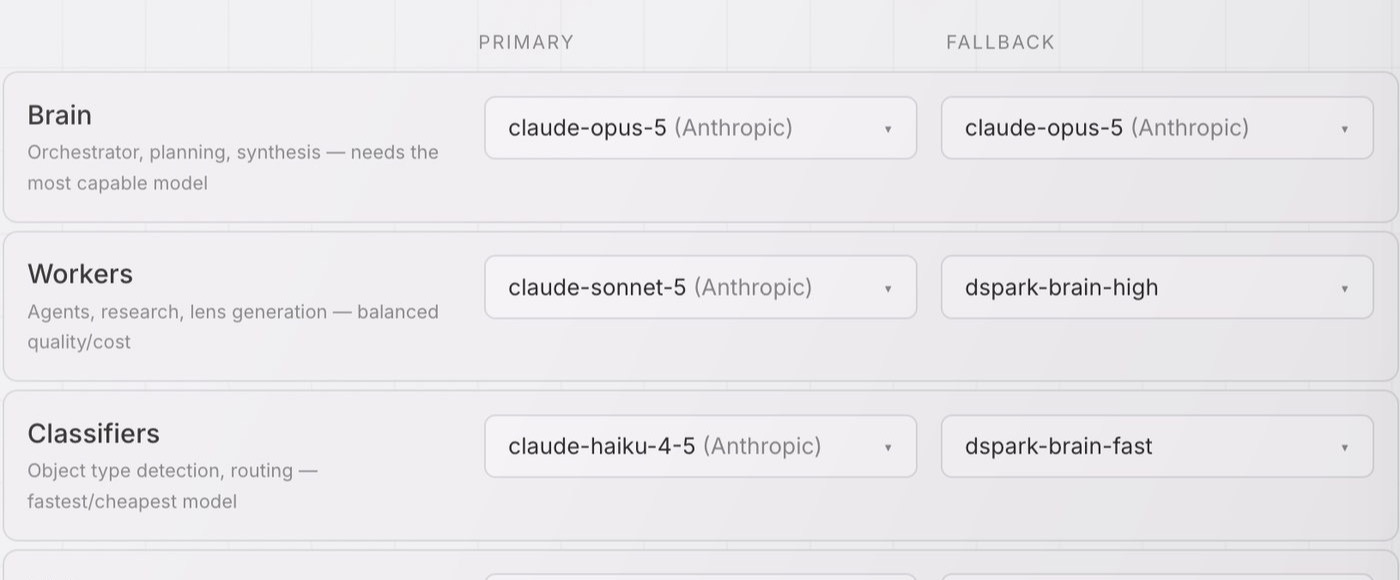
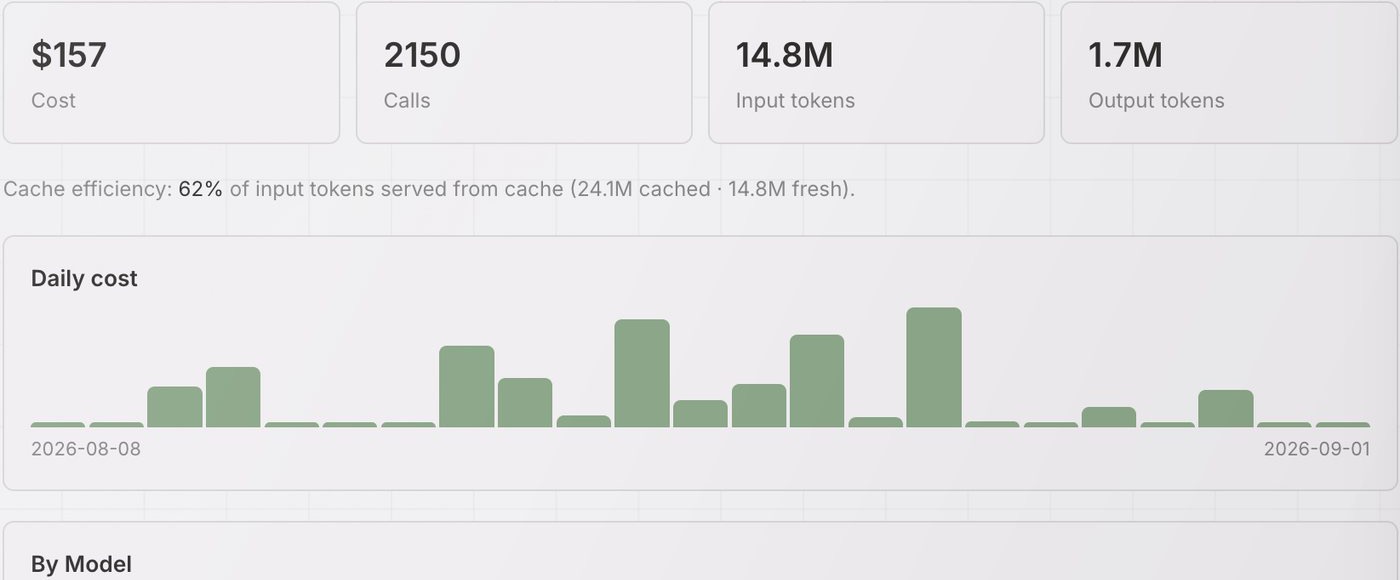
[Captures from September; replace with current screens before launch.]
How a team buys.
The buying flow
- 1
Start At launch
Install Jorv. Your organisation begins on Free, and on 14 days of Pro.
- 2
Try it with the team At launch
Invite colleagues. Everyone you invite works in Pro for the 14 days, so the team sees collaboration before anyone pays.
- 3
Check out once
Choose how many Pro and Enterprise seats, monthly or annually, in one checkout. Guests stay free.
- 4
Assign
A seat is counted when a person first signs in, never at invite. You decide who holds Enterprise, who holds Pro, and who is a guest.
- 5
Grow as the work spreads At launch
When an invited person signs in and needs a seat, your seat count grows by one and Paddle prorates the charge.
What Enterprise adds.
Sign‑in and provisioning
SAML single sign‑on, SCIM, group‑to‑role mapping, your own identity tenant.
Who may see what
Classification limits, administered; control over what leaves the network; the offline preset and offline licences.
Running it at scale
High availability, rolling upgrades, fleet runners and service accounts, alarm forwarding, consolidated billing with invoices and purchase orders At launch.
Access follows the work.
You see a project because you are on its team, approve because you review it, publish because you own it. Change the relationship and the access changes with it; there is no list someone forgot to update. On every tier.
The activity record
Every action is written once and cannot be quietly changed: who read what, who drafted, who approved, which model, which sources. When an auditor asks “who saw the client brief in March, and why?”, the answer is already there.
Enterprise adds the exportable report of where Jorv runs, who holds each key and what has left.
A wider rollout, or an agreement?
Tell us how many people, where it has to run, and what your auditor will ask. We answer within two working days.